
THE GOOGLE ECOSYSTEM & GEMINI NOTEBOOK VISUAL SOP BLUEPRINT
Dear Digital Creator, Marketer, or Strategic Consultant,
In today's fast-moving online landscape, the ultimate competitive advantage isn't just having content. It's having leverage. Google’s Gemini Notebook (formerly NotebookLM) represents a massive paradigm shift in how information is digested, but most digital marketers, agencies, and online businesses have absolutely no idea how to unlock its true power. They don't know how to program custom rules, automate player-facing tutorials, or structure their files so the AI runs perfectly without hitting severe character limits or hallucinating critical details.
They are leaving money, engagement, and authority on the table simply because they lack the technical instructions to connect Google’s brand-new AI features into a unified, high-converting digital product funnel.
That is exactly why we created the Google Ecosystem & Gemini Notebook Visual SOP Blueprint. We have documented every single step, click, and prompt sequence of the entire interactive gaming and simulation creation workflow into 15 hyper-visual, step-by-step cheat sheets.
And the best part? You are getting Unrestricted Resell Rights to this entire package.
Inside This 58-Page Visual Package
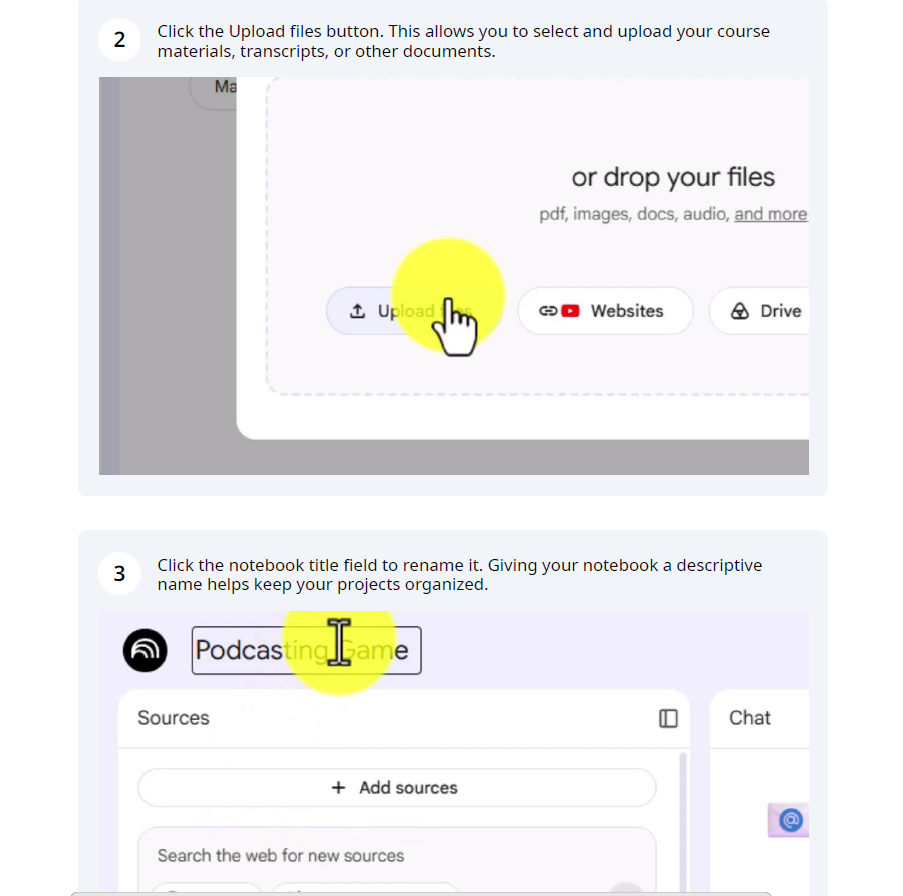
These are not vague, high-level summaries. These are highly detailed, visual step-by-step SOP documents that contain exact UI screenshots, button highlights, copy-pasteable prompts, and systematic instructions.
SOP 1: Ingesting Base Content & Triggering Summaries
Master the foundational step of organizing and preparing base source files. Learn the zero-padded sequential naming rules to prevent AI sorting confusion, trigger immediate auto-summaries by refreshing Gemini Notebook, and launch Google Gemini to establish your initial design concepts.
SOP 2: Advanced Prompts for Architecture Customization
Draft high-quality prompts in Gemini to generate five distinct interactive player scenarios. Learn to select and compare scenario variants, map state variables, and outline technical dependencies before pasting instructions into the simulation engine.
SOP 3: Uploading & Active-Testing Configuration Instructions
Configure Gemini Notebook's system-level instructions using the Custom chat settings within the strict 10,000-character limit. Learn how to format high-contrast summaries and establish tone guidelines so players receive clear, actionable in-game instruction.
SOP 4: Visual Branding & Cover Graphics with Gemini
Create eye-catching, custom notebook cover images by leveraging Gemini's image generation tools alongside interface screenshots. Learn exact parameters for style, color palettes, and text-safe margins to ensure a flawless visual fit.
SOP 5: Automated Onboarding Videos inside Gemini Notebook
Convert your written game rules and guidelines into high-quality onboarding videos using Gemini Notebook's Studio elements. Learn how to formulate a highly targeted custom prompt to instruct the Video Overview generator to produce structured "explainer" walkthroughs.
SOP 6: Creating Dynamic Help Media & Remedial Cues
Design robust visual and audio support paths to prevent player frustration. Learn to prompt Gemini for focused help audio scripts, rewrite configuration rules to trigger hints automatically, and rename your media files to match system calls.
SOP 7: Deploying Audio Briefs & Setting Up Welcome Notes
Navigate to Gemini Notebook’s Studio Panel to trigger and generate short-format help audios. Learn to update your active configuration, establish persistent welcome messages in the user summary, and compare voice outputs to ensure high engagement.
SOP 8: Renaming Media Assets & End-To-End Playtesting
Take on the persona of a naïve player to run comprehensive simulation tests. Learn to map provisional AI filenames to logical names matching game triggers. Playtest the workspace to identify edge cases and validate failure pathways.
SOP 9: Structuring Live Updates with Dynamic Syncing Docs
Build a bulletproof update loop using Google Drive. Learn how to separate your system rules from your playable narrative across two synchronized Google Docs, allowing you to deploy instant content hotfixes without rebuilding your conversation.
SOP 10: Generating 3D Box Shots and Product Artwork
Learn the configuration steps to enable image-generation inside Gemini Notebook or utilize Gemini as a fallback. Discover how to specify camera angles, studio lighting, branding hex codes, and product typography to render eye-catching 3D box shots.
SOP 11: Drafting Facilitator Slide Decks in Gemini Notebook
Move beyond the game environment and learn how to generate comprehensive, presenter-ready slide decks directly inside Gemini Notebook. Master the settings to output narrative slides, speaker notes, and facilitator discussion prompts.
SOP 12: Evaluating and Customizing Discussion Slide Decks
Learn how to audit generated presentations for topical alignment. Discover how to deselect broad source documents, transition from rigid templates to plain-language prompts, and easily add summary slides and calls to action.
SOP 13: Creating Video Guides and Importing to Google Vids
Import your finalized slides into Google Slides and port them directly into Google Vids. Learn to configure AI voiceover tracks, adjust slide timing to match narration pacing, disable default background tracks, and export finished video guides.
SOP 14: Generating High-Converting HTML Sales Code
Use Gemini Notebook to write high-converting sales copy and clean HTML directly from your game sources. Learn to inspect your code in an editor, embed it into a free Google Site, integrate third-party buy buttons, and map custom domains.
SOP 15: Executing Pre-Launch Cleanup & Classroom Setup
Execute final cleanup by removing redundant drafts, resetting active custom rules, and generating global shared links. Learn how to link your notebook to post-payment thank-you pages and configure a community discussion space using Google Classroom.
Special Upgrade Bonuses Included
To guarantee you have absolutely everything you need to position yourself as an expert on the recent platform updates, we are including two massive bonus packages—complete with Unrestricted Rights.
Bonus #1: The "Trainer Maker" Rebrand Package
Google recently rebranded NotebookLM to Gemini Notebook. We are giving you a massive done-for-you asset bundle to educate your customers on the name change and instantly position yourself as a subject matter expert:
- Live Video Slide Presentation: Includes PowerPoint, PDF, and Presentation Scripts.
- Video Recording Slide Presentation: Includes PowerPoint, PDF, and Presentation Scripts.
- Custom Infographic: A high-resolution visual breakdown of the transition.
- Lead Magnet Educational Audio: Ready-to-deploy audio file to capture leads.
- Cinematic Promotional Video: A high-end video asset for your marketing.
- Hand-Drawn Animated Videos: Delivered in both Female and Male Voiceover versions.
- Over-the-Shoulder Tutorial Video: A step-by-step visual breakdown of the name change.
- Educational Portal Access: Includes an explainer video and monetization strategy breakdown.

Bonus #2: The Complete Course Prompt Package
Stop guessing what to type into the AI. You are getting the exact, copy-pasteable prompt package that I used to generate the assets, rules, and configurations throughout this entire course.

Unlimited Profit Potential
Because we are handing you Unrestricted Resell Rights to this entire visual 58-page SOP bundle (in both ready-to-use PDF and completely editable MS Word formats), you can monetize this in virtually any way you see fit:
- Sell the bundle collectively as a premium "NotebookLM Masterclass" and keep 100% of the profits.
- Break the SOPs up individually and sell them as cheap, highly targeted $7 to $10 micro-cheat-sheets.
- Use individual SOPs as high-value lead magnets to grow your email list and sell premium consulting or agency services.
- Rebrand, rename, and customize the Word Documents to establish your own brand authority and sell them as your proprietary agency training systems.
- Bundle them as high-value bonuses to increase conversions on your primary affiliate or digital product offers.
- Publish them inside a paid Google Classroom or private member's community to generate recurring subscription income.
🎁 What's Included in Your Unrestricted Turnkey Package
- 15 Visual SOPs in Microsoft Word (.docx) Format: Fully editable, unbranded, and ready for you to paste your logo, change details, and claim as your own.
- 15 Visual SOPs in Print-Ready PDF Format: Professionally compiled and formatted step-by-step guides (collectively over 55 pages of visual, click-by-click instruction).
- The "Trainer Maker" Rebrand Upgrade: Presentations, Infographics, Audios, and Video Assets covering the shift to Gemini Notebook.
- The Master Prompt Package: Every prompt used in the curriculum.
- Hand-Drawn Animated Sales Video: A high-converting, professional, no-hype animated presentation to drive traffic and build immediate trust with your prospects.
- Responsive HTML Sales Page Template: The exact high-contrast, clean HTML/CSS code for this responsive sales letter to sell the cheat sheets as a group. Simply add your buy buttons and launch!
All Sales Are Final
🔒 All Sales Are Final For This Bundle Of Cheat Sheets.
Secure Your License & Turnkey Product Bundle Today
Get immediate access to the entire 15-part visual SOP package, editable files, animated promotional video, the Trainer Maker Bonus, the Prompt Package, and HTML sales page code. Claim your unrestricted resell rights instantly.
Don't let technical complexity or slow launch times hold you back. Secure your copy, master the Gemini Notebook Ecosystem, and launch a highly profitable, fully branded training suite today.